Modern financial operations require real-time data automation rather than manual text pasting. This guide covers how to deploy five essential Claude finance plugins, or MCP connectors, spanning local meeting data, live accounting ledgers, relational databases, external market metrics, and executive presentations. Each integration unlocks ready-made, multi-step prompt sequences to automate complex analytical workflows instantly.
Using Claude Connectors for Finance is the standard way to automate workflows, yet many professionals still manually paste data into their chat sessions. Financial records naturally live in separate systems: local meeting audio, live accounting ledgers, and external market feeds.
Claude uses data connectors and Model Context Protocol (MCP) servers to link these data sources directly to your workspace.
These 5 Claude Finance integrations allow CFOs, quants, and accountants to automate data retrieval, leaving the human expert to focus entirely on financial analysis.
Claude Connectors and Plugins vs Claude Skills
Understanding the technical difference between these two connection types changes how you design your financial workflows.
Claude Plugins and Connectors
In casual software discussions, tools that add features to an AI workspace are called plugins. Technically, Anthropic classifies tools like Airtable, Coupler.io, or Gamma as Claude connectors. These integrations use the open-source Model Context Protocol (MCP) architecture.
Claude has evolved significantly over the years, understanding which Claude version you’re working with helps you identify which connectors and MCP features are available to you.
MCP servers act as secure data bridges. When you use a connector, Claude sends a structured request across the protocol to the external application, fetches the required ledger or meeting data, and processes it inside your active session. This setup is ideal for syncing live data from separate platforms.
Claude Skills
Skills run custom, version-controlled code directly inside Claude’s native workspace execution environment. Instead of calling a separate app, a custom financial skill allows Claude to perform operations locally. For example, a Claude skill can process big data files, run local Python scripts to calculate asset depreciation, or modify complex Excel models directly while preserving formula dependencies.
Top 5 Claude Connectors for Finance to 10X Your Workflow
Here are the top 5 Claude connectors for finance to act as your financial assistants:
Jamie (The Meetings Layer)

Financial decisions happen in unrecorded client calls, internal audits, and negotiations. This conversational data usually gets lost, and manual tracking misses critical context. Jamie connects this layer directly to Claude.
The system
Jamie is a local-first, privacy-focused meeting assistant built for confidential financial operations.
- Local architecture: It captures audio directly on your machine. No external bots join your calls, and no conversations pass through third-party servers.
- Compliance: The software is fully GDPR compliant, hosted in the EU, and encrypts all processed data.
- Zero AI training: Jamie never uses your conversations or files to train external AI models. Files are permanently deleted after processing.
How to Install Jamie:
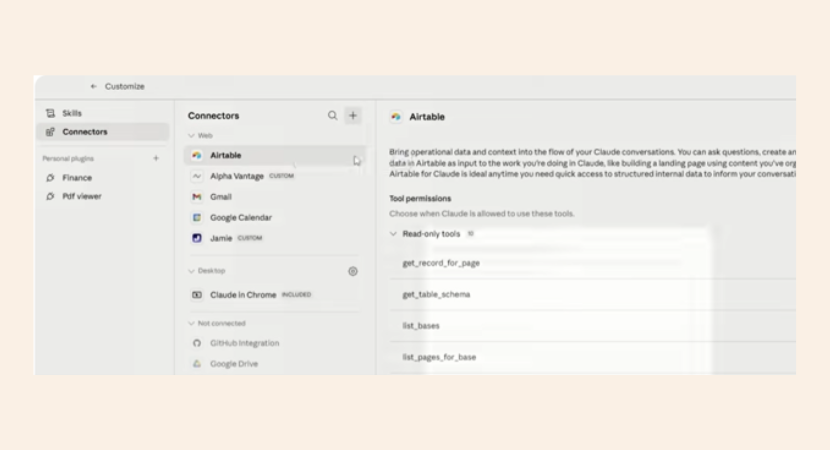
To connect it:
- open Jamie in Claude Cowork, click customize,
- go to connectors,
- select add custom connector,
- paste in the Jamie MCP server URL,
- click add,
- and then complete the login.
The Audit Workflow
You can run this three-step prompting sequence to extract data from your conversations:
Summarize my recent finance meetings. Outline the main topics discussed, key decisions made, and all open action items.
Identify the specific financial liabilities, operational risks, or macro shifts discussed across these meetings. List the actions currently taken for each item.
Build a prioritized action plan using a 4-to-6-week timeline. Organize the tasks by priority levels P1, P2, and P3, and assign clear ownership by organizational role.
Claude uses its spreadsheet skill (XLSX skill) to output a multi-sheet workbook. This file maps your conversational risks directly to an execution roadmap.
Coupler.io (The Live Data Layer)
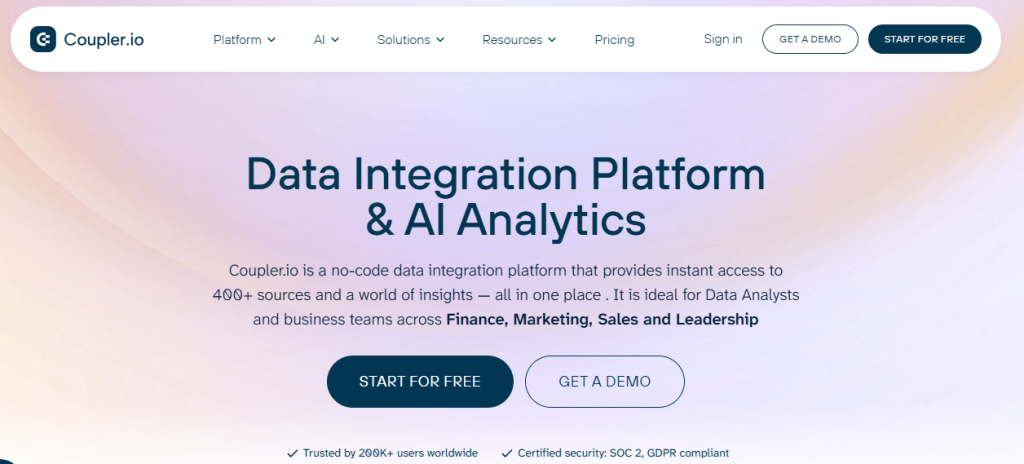
Financial reporting suffers from a data freshness problem. Financial records sit isolated across accounting tools, CRMs, and separate spreadsheets. By the time you download a CSV export and manually update your models, the insights are out of date. Coupler.io feeds this data to Claude automatically.
Live data automation
Coupler.io is a no-code ETL Claude finance connector that automates your data pipeline.
- Direct integration: The tool connects to hundreds of business applications simultaneously to assist with managing the general ledger.
- On-the-fly transformation: It extracts raw data, transforms its structure, and automates workflows like automated bank reconciliation in an environment built for Claude to read.
- Structural constraint: This connector requires an organized data architecture. If your internal ledger tables are messy or inconsistent, Claude cannot perform accurate analysis.
How to Install Coupler.io:
To install it;
- click the plus icon,
- go to connectors,
- then select add connector,
- then search for Coupler.io,
- click connect
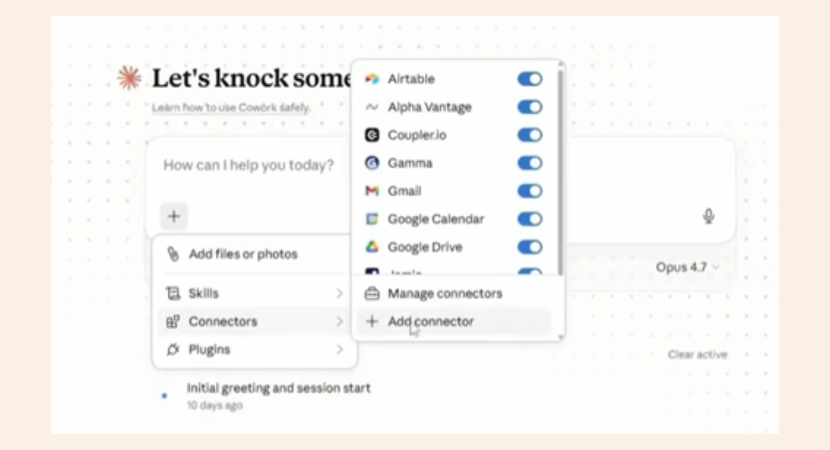
And then log in, and then authorize access. And once connected, confirm it is toggled on in the chat.
The CFO Analysis Workflow
You can pull live data into your workspace using this direct command:
Pull the latest Coupler.io financial dataset. Analyze these numbers like a CFO. List the largest cost drivers, pinpoint any unusual spending patterns, and give me 3 specific recommendations based strictly on this data.
Claude calls the Coupler.io connector to check available data flows. It reads your database columns, maps fixed versus variable costs, and verifies the schema before running its analysis. The output shows a live view of your payroll expenses and operational costs alongside data-validated recommendations.
Airtable (The Relational Data Architecture)
Financial datasets usually live in isolation. Expenses sit in one spreadsheet, invoices sit in another, and customer records remain separate. Answering simple questions, like finding your exact operational cost per customer, requires manual, error-prone data compiling. Airtable builds structural links between these fragments.
Relational Data Systems
Airtable holds your data inside a connected database structure.
- Explicit relationships: Transactions link to categories, categories connect to budgets, and invoices attach to specific profiles for auditing accounts receivable balances.
- Automated auditing: Claude reads across these connected tables simultaneously, removing the need for manual sheet cross-referencing.
- Context batching: When your transaction records exceed Claude’s single-context window, the model automatically switches to a batch-processing mode to analyze the database in segments.
How to Install Airtable:
To install it:
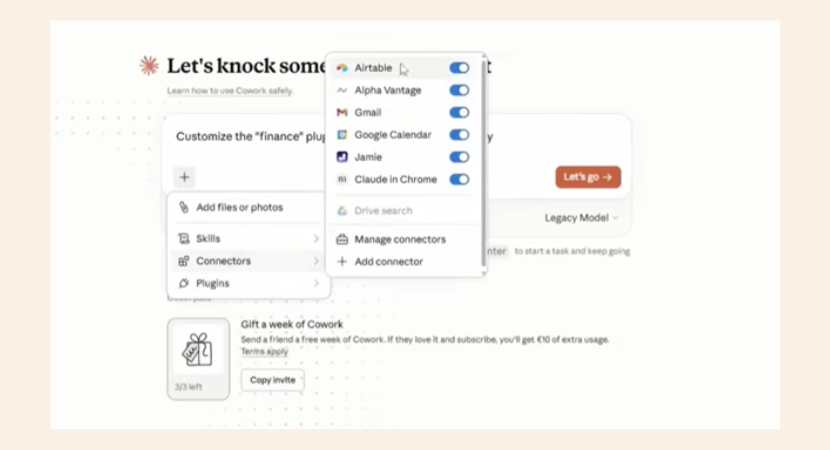
- click the plus icon,
- go to connectors,
- select add connector,
- search Airtable,
- click connect,
- then login and then authorize access.
The cross-reference workflow
You can initiate a complete relational audit by naming the tool directly:
Use my Airtable data to generate a full financial overview covering revenue trends, expense structures, and cash flow. Flag any structural deficits or data gaps across the tables.
Claude maps your available bases and tables, then automatically runs data quality checks. If fields are missing, it flags them before outputting your metrics. Because this connector runs alongside your active meeting data, you can instruct Claude to check hard ledger numbers against conversation files to spot strategic underreactions.
Alpha Vantage (The External Market Context Layer)
Internal business metrics mean nothing in a vacuum. A company growing at 12% looks successful, unless the broader industry average is 35%. Rising operational costs are only actionable if you can identify whether they are caused by internal inefficiencies or market-wide macroeconomic shifts. Alpha Vantage brings this external context into your chat session.
Global Market Indicators
Alpha Vantage connects Claude directly to financial markets and economic data.
- Asset tracking: The tool pulls global stock prices, foreign exchange (Forex) rates, and commodities data.
- Macro metrics: It monitors economic indicators, including inflation metrics and interest rates.
- Session integration: You can blend internal corporate numbers with public market developments without changing tabs.
Key Features:
- Delivers direct access to stock market prices, foreign exchange (Forex) rates, commodities tracking, core company fundamentals, and critical macro indicators like inflation metrics and interest rates.
- Allows financial analysts to blend internal corporate data subscriptions with external market environments inside a single natural language AI session.
How to Install Alpha Vantage:
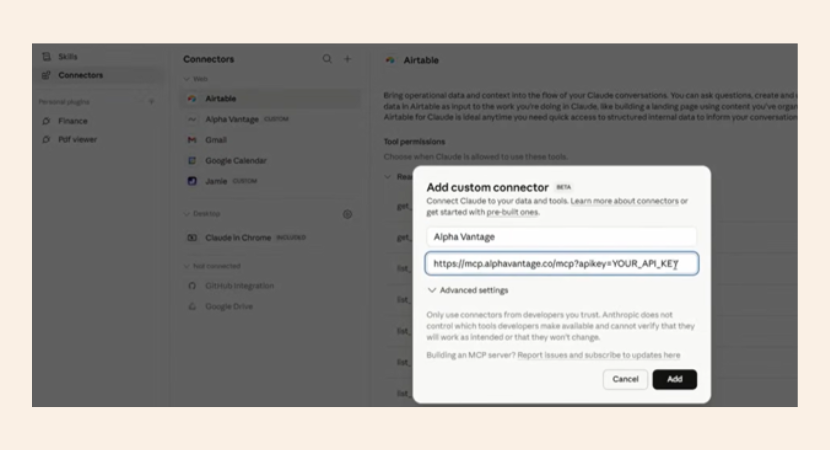
Alpha Vantage connects via the Model Context Protocol (MCP). Open your local configurations file (claude_desktop_config.json) and add the server setup to your file configuration:
{
“mcpServers”: {
“alpha-vantage”: {
“command”: “uvx”,
“args”: [“mcp-server-alphavantage”],
“env”: {
“ALPHA_VANTAGE_API_KEY”: “YOUR_API_KEY_HERE”
}
}
}
}
he Market Comparison Workflow
You can pull public datasets using this specific command string:
Run a SaaS industry market analysis. Start with the macroeconomic landscape including current interest rates and inflation. Connect this data to sector performance using public peer companies, and provide an equity research-style conclusion.
If your data requests hit the connector’s free-tier API rate limits, Claude automatically self-paces the requests. It prioritizes the most critical data streams and alerts you of the daily cap status while continuing with the research. The output provides an institutional-style market brief detailing valuation resets, multiple compression, and sector metrics.
Gamma (The Presentation & Deliverable Layer)

High-level financial analysis and raw data tracking are useless if you cannot communicate them to an executive leadership team. Manually building slide decks and formatting layouts is a massive time sink. Gamma converts your underlying data analysis into a structured presentation inside your chat session.
Designed Communication
Gamma translates text data into visual layouts automatically.
- Structural hierarchy: The tool designs presentations with visual contrast and narrative flow based on your raw data.
- Asset translation: It converts dense text blocks into functional trend charts, cost-concentration graphs, and executive timelines.
- Context retention: Because it operates inside your active Claude session, it retains the analysis performed by your other data connectors.
Key Features:
- While Claude can natively generate text outlines for slides, Gamma converts raw analytical data into formatted presentations featuring visual contrast, explicit structural hierarchy, and strategic narrative flow.
- It translates heavy text datasets into functional charts, trend graphs, and executive timelines automatically.
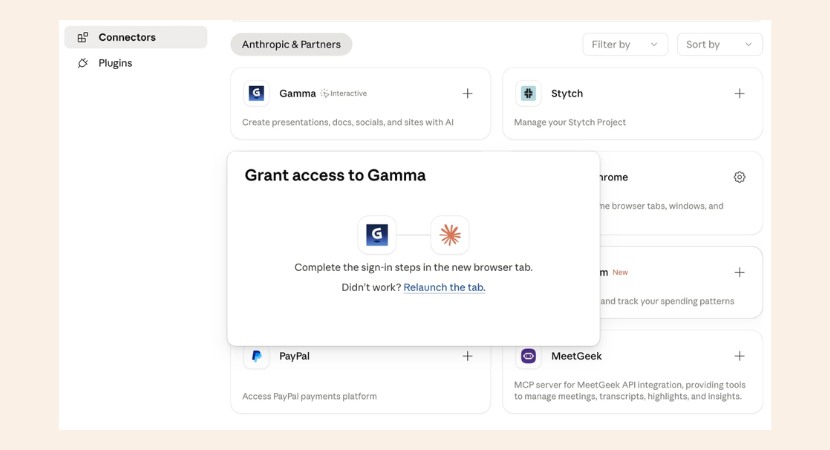
How to Install Gamma:
To install it:
- click the plus icon,
- go to the connectors,
- select add connector,
- search Gamma,
- click connect,
- authorize, and toggle it on.
The Board Briefing Workflow
You can command Claude to hand the generation over to Gamma using this direct Claude prompt:
Take everything we have analyzed across the Coupler, Airtable, and Alpha Vantage data. Transform this context into a board-level briefing presentation using Gamma. Include a financial overview, a visual chart of our cost-concentration drivers, and our top recommendations mapped to quantified savings.
The tool generates a polished 10-slide deck. The output includes an execution roadmap separating immediate actions from items requiring leadership approval. It features a financial variance waterfall chart showing how your cost base drops once the proposed savings are applied.
Summary Table for Claude Connectors for Finance
| Claude Finance Plugin | Functional Layer | What It Replaces | Key 2026 Feature |
|---|---|---|---|
| Jamie | Meeting Intelligence | Manual minutes, forgotten call details | Local-first, GDPR-compliant MCP audio capture (No external bots) |
| Coupler.io | Live Data Streaming | Outdated CSV exports, static dashboards | Continuous, no-code ETL pipeline directly into Claude’s context |
| Airtable | Relational Databases | Disjointed, floating spreadsheets | Links disparate tables (Ledgers, CRM, Invoices) for deeper auditing |
| Alpha Vantage | Macro Context | Manual equity research, economic googling | Fetches global stocks, macro indicators, and inflation metrics via MCP |
| Gamma | Executive Presentation | Hours spent formatting PowerPoint slides | Automatically builds board-ready 10-slide decks and waterfall charts |
What are The Best Claude Connectors for Finance Available for Free?
For professionals looking to build an automated workflow without upfront software overhead, open-source options and free-tier integrations provide massive leverage:
- Alpha Vantage (Free-Tier API Key): Connects Claude to direct global market context, stock price history, and macro-economic data through a simple API setup.
- Airtable (Free Tier): Serves as a free relational database to organize transactions, link vendors to budgets, and isolate financial anomalies.
Pro Tip for Free Claude Connectors for Finance:
For free-tier data integrations like Alpha Vantage, Claude may occasionally hit API rate limits. Instead of failing, the model is engineered to self-pace its requests, prioritizing the most critical data streams while informing the user of the daily cap status.
What Are the Best Claude Connectors for Finance According to Reddit Users?
Reddit finance communities consistently recommend five core Claude plugins for analysts.
- In subreddit r/vibecoding, users praise Jamie for confidential meeting capture without third-party bots.
- r/FPandA members highlight Coupler.io for keeping financial data live across accounting tools and CRMs.
- The subreddit r/ClaudeCode thread recommends Airtable for structured relational data where transactions connect to categories and vendors.
Reddit users stress these plugins work best chained together in single Claude Cowork sessions, shifting your role from data assembly to judgment-based decision-making.
The Reddit community consensus on Claude plugins for finance: start with free open-source plugins before investing in premium tools.
Why Did PwC Co-Sign Anthropic’s New Claude Connectors for Finance?
Anthropic released five purpose-built Claude Connectors for Finance (financial analysis, investment banking, equity research, private equity, wealth management) with PWC’s official co-signature.
PwC is quoted in the announcement discussing “bringing AI agents into the office of the CFO”.
Here’s what matters for small CPA firms under 50 employees: Claude now works across Excel and PowerPoint simultaneously in the same session, pulling quarterly data, building variance analysis, then creating a 5-slide board deck without copy-pasting .
These Claude connectors for finance are open-source and free on GitHub, but installation requires cloning repos, configuring MCP connections, and customizing to your firm’s terminology.
Anthropic also built a private plugin marketplace where firm admins can build custom plugins and push them to every employee. The big four (PWC, Goldman Sachs) already deploy this; small firms need workflow experts to implement it properly.
Ending Note on Claude Connectors for Finance
These 5 Claude connectors for finance allow Anthropic’s AI to gather meeting details, stream data, read relational records, check market details, and format presentations. Using them together automates your analytical pipeline. And your time shifts from data assembly to financial judgment.
