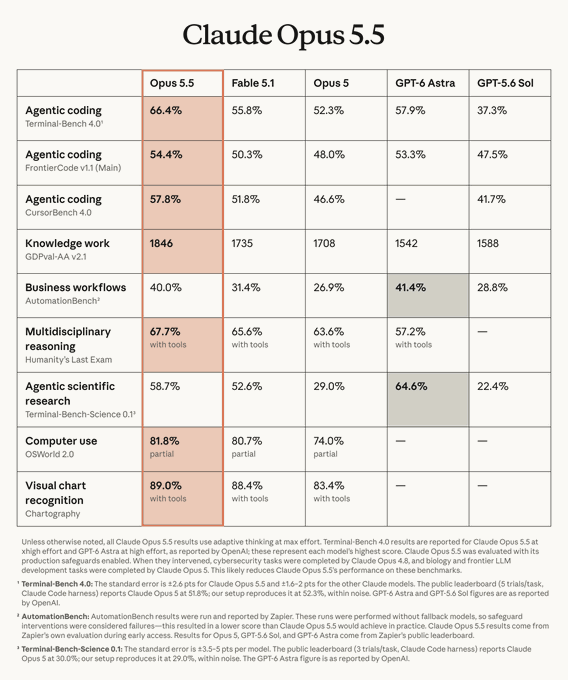
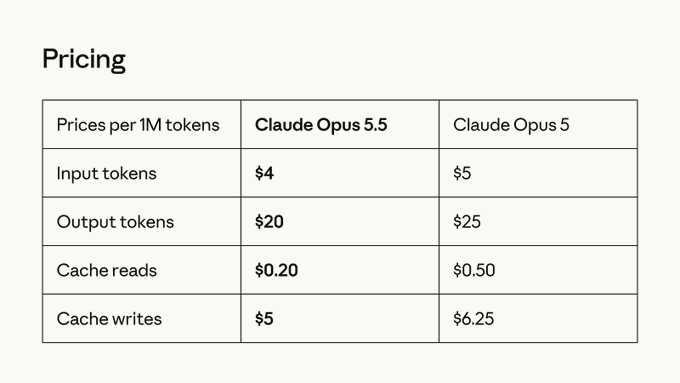
Claude Opus 5.5 is the first model in Anthropic’s new Claude 5.5 family. It matches Claude Fable 5.1 on most tasks. It runs about 30% faster and costs about 40% less per task than Opus 5.
If Fable 5.1 itself is more your speed, we’ve also covered where that model pulls ahead in real workflows.
This article looks at real practical use cases of Opus 5.5 and what people are doing with it. The focus is on creative work and iterative workflows. Developers, designers, and creators have already shared many practical results.
Looking at those results shows where the new Claude AI model is useful right now.
What Is Claude Opus 5.5?
Claude Opus 5.5 is Anthropic’s latest high-capability model in the Claude series. It sits at the top of the current lineup for complex work.
It handles advanced reasoning, writes code, and produces visual and animation output. That includes JavaScript and canvas work, as well as tools like Blender. It also supports multi-step workflows.
You can use it on Claude.ai, in Claude Code, or through the API. The lower cost and higher speed make new Claude Opus 5.5 easier to run more experiments and refine results.
What are Key Improvements of Claude Opus 5.5 Over Previous Opus 5 Family
Opus 5.5 delivers performance close to higher-tier models while costing less and responding faster.
It shows stronger design sense and better quality in frontend and JavaScript animations. It also handles iterative refinement through workflows more smoothly.
One-shot results for complex visual and narrative work are more reliable than before.
These changes matter for anyone doing high-volume or cost-sensitive creative and development work. You can try more ideas and still stay within practical limits.

Claude Opus 5.5 Creative Animation and Visual Storytelling Use Cases
Claude Opus 5.5 generates complete narrative sequences in pure JavaScript. No external image assets are needed. The model writes the story, draws every frame, synthesizes music, and polishes the result.
Short Film
One example produced a short film called “small print.” Claude collects everyday human details from requests, turns them into stars, and forms a constellation at night. Everything ran in a single HTML file.
Life Timeline
New Opus model can animate its own history or life timeline with brush-stroke canvas rendering. One version traced Claude’s development from the start to the present using only JavaScript drawing.
Full Claude Models
A user built a full Claude version history models as a hand-drawn canvas animation, again in pure JavaScript.
Acrylic Drawings
The new latest Claude model converts personal photos into cohesive acrylic-style drawings. One user fed it New Zealand trip pictures and received a set of matching acrylic illustrations rendered entirely in JavaScript.
Short Film
Claude Opus 5.5 can produce narrative and philosophical short films end-to-end. One video explored the purpose of life and delivered a complete piece that the creator found surprising.
Claude Opus 5.5 Design and Product Visualization Use Cases
Claude Opus 5.5 handles iterative website redesigns through workflows. It generates multiple concepts, critiques them, and refines the direction.
Personal Site
One user on X asked the latest Claude model to redesign a personal site and then produce a trailer of all the iterations.
Product Promo
It creates multi-shot product promo videos in one pass. Every element, including screens, is animated in Blender. Token use stayed low even with heavy testing.
Sketch to Animated Video
The model turns simple sketches into interactive or animated simulations. One demonstration showed a full sketch-to-simulation pipeline.
Educational Animations
It builds educational or brand histories as pure JavaScript hand-drawn animations. The Claude models timeline mentioned earlier is a clear example of this approach.
Claude Opus 5.5 Advanced Tool-Integrated and One-Shot Generation Use Cases
Claude Opus 5.5 works directly with tools like Blender. It can generate claymation sequences from a single prompt.
Claymation Generation
One example showed it creating a full claymation piece inside Claude without extra steps.
Narrative-based Videos
It also produces complete promotional or narrative videos in one pass or with light iteration. Every shot can be animated, including complex elements. One demonstration claimed a full video came out in a single run.
The model supports agent-style workflows. It writes code, opens the result, checks frames, spots problems such as rendering errors, and fixes them. This loop improves the final output without constant human input.
Token use stays practical even during heavy testing. Users report getting strong results while staying within normal limits.
Practical Benefits Across Use Cases of New Claude Opus 5.5
- Opus 5.5 costs less and runs faster than earlier Opus versions. That makes repeated trials and refinements realistic for most people.
- It often needs fewer external assets. Many visual results come from pure JavaScript or built-in tools. This shortens the path from idea to finished piece.
- Design quality and frontend animation work are stronger. JavaScript animations and interactive pieces look more polished than before.
The model fits both quick prototypes and finished creative or technical projects. You can test more ideas without the cost climbing as fast.
Getting Started with Claude Opus 5.5
You can access Claude Opus 5.5 on Claude.ai, in Claude Code, or through the API.
Start with clear prompts for animation, design, or 3D work. For animations, ask it to write the full sequence in JavaScript or use Blender. For design, describe the goal and request iterations with critique.
Getting consistent results also comes down to prompting fundamentals, which is part of the broader set of skills developers need for working with AI models day to day.
Use workflows when you want the model to generate, check, and refine results on its own. Watch token use on longer projects, but the lower cost makes this easier than before.
Compare outputs with earlier models on the same task if you need a direct sense of the difference.
Last Word
Claude Opus 5.5 matches higher-tier performance at lower cost and higher speed. Real examples show it handling pure JavaScript animations, artistic style work, website redesigns, 3D product videos, and full short films.
These results come from everyday users testing it on creative and technical tasks. The combination of capability and efficiency makes it practical for both quick tests and finished projects.
For anyone still getting comfortable with prompting and workflows at this level, Anthropic’s structured learning resources are worth a look too.
Try it on your own work to see where it fits.
FAQs on Claude Opus 5.5
Q#1. What are the main advantages of Claude Opus 5.5 compared with previous Claude Opus versions and Fable 5.1?
It performs at a level close to Fable 5.1 on most tasks. It runs about 30% faster and costs about 40% less per task than Opus 5.
Q#2. Which use cases show the strongest gains in animation and design quality?
Pure JavaScript animations, acrylic-style drawings, Blender claymation, and iterative website redesigns stand out in the examples shared so far.
Q#3. How does the model handle pure JavaScript visual generation without external assets?
It writes the story, draws frames with canvas or similar methods, adds music when needed, and polishes the result inside a single HTML file or script.
Q#4. Is Opus 5.5 suitable for one-shot complex video or 3D production?
Yes. Users have produced multi-shot promo videos and claymation pieces from a single prompt or light iteration, including full Blender animation.
Q#5. What workflows or tools pair especially well with the model?
Agent-style loops that generate, view frames, and fix problems work well. Blender and pure JavaScript canvas setups also produce strong results.
Q#6. How should users approach cost and token management for creative projects?
The lower per-task cost supports more iteration. Still track usage on long sessions, especially when the model re-reads large contexts during workflows.
